Best Golf Ball Printer Machines for Personalization and Branding
If you’re looking to personalize golf balls with logos, monograms, or custom designs, a dedicated golf ball printer is essential. This guide highlights five dependable options ideal for different buyers—from DIY hobbyists to small studios—focusing on direct-to-object printing capabilities, ink management, and usability. Whether you want glossy, durable results on golf balls or a compact starter printer, these picks balance performance and value. The following sections explain who each product is best for and why it was selected.
| Product | |||
|---|---|---|---|
| RAINBOWDGT A3 UV Printer | UV Printer | Beginner to intermediate DIYers | White ink circulation with self-cleaning head; prints on glossy, waterproof finishes |
| Procolored V6 Panda UV Printer 6.7″ A4 L800 | UV Printer | Small studios and hobbyists | Direct print on objects with stable CMYK+WW ink and auto-cleaning |
| DSV F1080 UV Printer Bundle | All‑in‑One UV DTF Printer | Businesses needing turnkey setup | 7-inch pre-installed computer and smart head protection with QR design |
| PEIXU A4 L1800 UV DTG Printer | UV DTG/Flatbed Printer | Versatile material printing | Direct printing on diverse materials including golf balls; cylinder capability |
| Eurannit 260E TIJ Inkjet Coding Machine | Industrial Inkjet Coder | Professionals needing date/QR/lot coding | Fast, multi-line printing with adjustable fonts and colors |
RAINBOWDGT A3 UV Printer, White Ink Circulation

Best for beginners who want a ready-to-run setup. The upgraded UV printer includes a white ink circulation system and an agitation mix to prevent nozzle clogs, plus an infrared auto-height adjustment and self-cleaning printhead. It’s optimized for high-resolution stickers and 3D effects, with waterproof and UV-resistant finishes. The bundled Windows laptop simplifies initial setup, making it a solid choice for a first foray into golf ball customization.
Best for: new hobbyists or small print studios seeking an all-in-one, easy start. Caution: the included laptop is a basic setup; a preferred software upgrade may be desired for advanced workflows.
Procolored V6 Panda UV Printer 6.7″ A4 L800
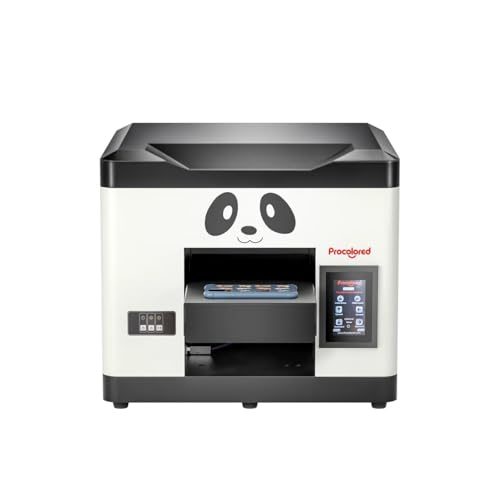
Best for compact workspaces and small studios that need direct-on-object printing. The Procolored V6 Panda supports CMYK+WW ink and features a steady ink supply with an auto-cleaning printhead. Its printable width of 210mm makes it suitable for producing golf ball decals and small graphics with crisp color. The infrared height sensor helps protect the printhead during operation. Choose this if you value a compact footprint and straightforward, direct-object printing.
Best for: small shops prioritizing a simple, durable direct-print workflow. Limitation: while suitable for golf balls, it may require careful jigging for perfectly centered ball prints on curved surfaces.
DSV F1080 UV Printer Bundle
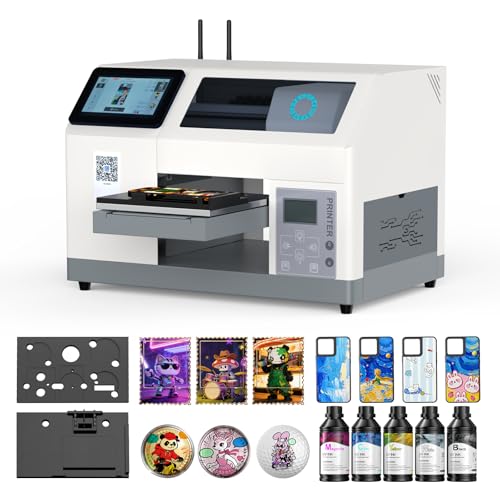
Best for businesses needing a turnkey UV printing solution with an integrated computer. This bundle features a 7-inch built-in computer, auto white ink stirring, and a smart print head protection system. A QR code design workflow allows quick mobile design transfers, which is helpful for on-the-go golf ball customization jobs. It’s efficient during peak order periods due to its built-in queuing and automation features.
Best for: operators who want a turnkey system with minimal setup and strong workflow automation. Caution: the bundle’s complexity may require a learning period for optimal use.
PEIXU A4 L1800 UV DTG Printer

Best for versatility across many substrates, including golf balls. The A4 L1800 model offers a 6-color print head, high-resolution outputs, and the ability to print directly on objects without pretreatment. It supports both flat and cylindrical printing modes, enabling direct prints on golf balls, bottles, and more. The large LED touch screen simplifies status monitoring and settings, and Windows compatibility broadens usability.
Best for: shops needing a multi-material printer with direct-object capabilities and flexible print geometry. Caution: ensure stable jigging on curved surfaces like golf balls for centered designs.
Eurannit 260E TIJ Inkjet Coding Machine

Best for high-speed industrial coding with robust options for date, batch, QR, barcode, and logos. The 260E offers a 7-inch touch screen, multi-color options, and optional encoders for precise alignment. It’s designed to boost production line efficiency, making it a strong choice for shops that require rapid, repeatable markings on small round items like golf balls.
Best for: industrial setups needing precise, rapid coding alongside print capabilities. Caution: this device focuses on coding rather than full-color graphics for complex ball designs.
Buying Guide
What should you consider when choosing a golf ball printer?
- Printing method: Direct-on-ball UV printers provide durable, waterproof finishes, while inkjet coding machines offer high-speed labeling. Your choice depends on desired durability and the complexity of the design.
- Print area and geometry: Golf balls require curved-surface handling. Look for printers with adjustable height sensors, object-dedicated jigs, or cylinder-printing capability for centered, crisp results.
- Ink system: White ink circulation and auto-cleaning help prevent nozzle issues and improve color fidelity, especially on glossy surfaces.
- Ease of setup: Bundled computers or included design software can reduce setup time, beneficial for beginners or small teams.
- Workflow efficiency: Features like automatic white ink stirring, printhead protection, and queuing mechanisms support higher order throughput during peak seasons.
- Materials supported: Confirm compatibility with golf balls and any coatings or pre-treatments required by the chosen printer.
FAQ
Can a UV printer directly print on a golf ball?
Yes, many UV printers can print directly on golf balls, offering durable color and gloss finishes with UV resistance.
Is a built-in computer necessary for desk-based setups?
Not strictly necessary, but a bundled computer can simplify software installation and reduce setup time for beginners.
Do these printers require special inks for golf balls?
Yes, most golf-ball printing workflows use UV-curable inks or fast-drying pigment inks designed for curved surfaces and glossy substrates.
What maintenance is typical for UV printers?
Common maintenance includes printhead cleaning cycles, ink stirring management, and occasional nozzle checks to prevent clogs.
Which option is best for high-volume orders?
Systems with intelligent print head protection, queuing, and automated cleaning support higher order throughput and reduce downtime.
Can I use these printers for other objects besides golf balls?
Yes, most listed printers support multiple substrates, including bottles, plastics, metal, and glass, depending on model capabilities.